-Shared Memory Allows two unrelated processes to access the same memory.
-Shared memory is created by one process and appears to other processes by attach.
-If one process writes to shared memory, the changes immediately visible to any
other process that has access to shared memory.
-Shared Memory provides no synchronization.
Header files to include: <sys/types.h> ,<sys/ipc.h>, <sys/shm.h> <unistd.h>
Creating Shared Memory:
int shmget (key_t key, size_t size, int shmflg);
- Key: unique identification to memory
- Size: of shared memory
- Shmflg: IPC_CREAT | WR permissions, IPC_PRIVATE
- Returns:On Success: shmid On failure: -1
Attaching Shared Memory:
void * shmat(int shmid, void * shmaddr, int shmflg)
– Shmid: returned by shmget
– Shmaddr: shared memory segment address (normally NULL)
– Shmflg : SHM_RDONLY, SHM_RND
- Returns: on success: attached address, on failure: (void*)-1
Detaching Shared Memory:
int shmdt (void *shmaddr)
– Shmaddr: address returned by shmat
- Returns: on success: 0 on failure: -1
Removing Shared Memory:
Shmctl(int shm_id, int cmd, struct shmid_ds *buf)
- shm_id: returned by shmget
- cmd: command to control shared memory ex: for remove IPC_RMID
- Returns: on success:0 On failure:-1
/* Shared Memory implementation */
/* FileName: SMServer.c */
#include <sys/types.h>
#include <sys/ipc.h>
#include <sys/shm.h>
#include <stdio.h>
#include <stdlib.h>
#define MAXSIZE 100
int main()
{
char c;
int shmid;
key_t key;
char *shm, *s;
key = 1234;
// Creating shared memory
if ((shmid = shmget(key, MAXSIZE, IPC_CREAT | 0666)) < 0)
{
printf("Error in creating shared memory \n");
exit(0);
}
else
printf("Shared Memory Created with id %d\n", shmid);
// Attaching shared memory to this process
if ((shm = shmat(shmid, NULL, 0)) == (char *) -1)
{
printf("Error in attaching shared memory \n");
}
else
printf("Shared memory attached \n");
s = shm;
// Writing data on shared memory
printf("\nEnter a message to add to message queue: ");
scanf("%[^\n]s",s);
getchar();
printf("Entered message now available on Shared memory \n");
// Deleting shared memory
//if(shmctl(shmid, IPC_RMID, 0)==0)
//printf("Shared memory deleted\n");
exit(0);
}
To Run: gcc SMServer.c
./a.out
/* FileName: SMClient.c */
#include <sys/types.h>
#include <sys/ipc.h>
#include <sys/shm.h>
#include <stdio.h>
#include <stdlib.h>
#define MAXSIZE 100
int main()
{
int shmid;
key_t key;
char *shm, *s;
key = 1234;
if ((shmid = shmget(key, MAXSIZE, 0666)) < 0)
{
printf("Error in accessing shared memory \n");
exit(0);
}
else
{
printf("Accessing shared memory od id %d\n", shmid);
}
if ((shm = shmat(shmid, NULL, 0)) == (char *) -1)
{
printf("Error in attaching shared memory\n");
}
else
{
printf("Shared Memory Attached \n");
}
//Now read what the server put in the memory.
for (s = shm; *s != '\0'; s++)
putchar(*s);
putchar('\n');
if(shmdt(shm)==0)
{
printf("Shared memory detached\n");
}
exit(0);
}
To Run: gcc SMClient.c
./a.out
Friday, October 18, 2013


Mapping & Unmapping a XWindow
XMapWindow(Display*, Window) - is used to map(visible) a Xwindow on top of all window.
XUnmapWindow(Display*, Window) - is used to unmap(hime) a Xwindow.
/* CPP program to map & unmap a Xwindow */
/* FileName: MapUnMap.cpp */
#include<X11/Xlib.h>
#include<assert.h>
#include<unistd.h>
#include<iostream>
#include<stdio.h>
#define NIL (0)
int main()
{
Display *dpy = XOpenDisplay(NIL);
assert(dpy);
int blackColor = BlackPixel(dpy, DefaultScreen(dpy));
int whiteColor = WhitePixel(dpy, DefaultScreen(dpy));
Window w = XCreateSimpleWindow(dpy, DefaultRootWindow(dpy), 0, 0,
200, 100, 0, blackColor, blackColor);
XSelectInput(dpy, w, StructureNotifyMask);
XMapWindow(dpy, w);
sleep(2);
printf( "Mapping : : 0x%x\n", (unsigned int)w);
int count=1;
GC gc = XCreateGC(dpy, w, 0, NIL);
XSetForeground(dpy, gc, whiteColor);
XEvent event;
while ( 1 ) {
XNextEvent( dpy, &event );
if ( event.type == MapNotify ) {
XMapEvent *mapevent = (XMapEvent *)&event;
printf( "UnMapping : 0x%x\n", (unsigned int)(mapevent->window) );
++count;
XUnmapWindow(dpy, w);
sleep(2);
}
if ( event.type == UnmapNotify ) {
XUnmapEvent *unmapwindowevent = (XUnmapEvent *)&event;
printf( "Mapping : 0x%x\n", (unsigned int)(unmapwindowevent->window) );
++count;
XMapWindow(dpy, w);
sleep(2);
}
if(count==10)
break;
}
XFlush(dpy);
sleep(3);
return 0;
}
To Run: g++
./a.out
XUnmapWindow(Display*, Window) - is used to unmap(hime) a Xwindow.
/* CPP program to map & unmap a Xwindow */
/* FileName: MapUnMap.cpp */
#include<X11/Xlib.h>
#include<assert.h>
#include<unistd.h>
#include<iostream>
#include<stdio.h>
#define NIL (0)
int main()
{
Display *dpy = XOpenDisplay(NIL);
assert(dpy);
int blackColor = BlackPixel(dpy, DefaultScreen(dpy));
int whiteColor = WhitePixel(dpy, DefaultScreen(dpy));
Window w = XCreateSimpleWindow(dpy, DefaultRootWindow(dpy), 0, 0,
200, 100, 0, blackColor, blackColor);
XSelectInput(dpy, w, StructureNotifyMask);
XMapWindow(dpy, w);
sleep(2);
printf( "Mapping : : 0x%x\n", (unsigned int)w);
int count=1;
GC gc = XCreateGC(dpy, w, 0, NIL);
XSetForeground(dpy, gc, whiteColor);
XEvent event;
while ( 1 ) {
XNextEvent( dpy, &event );
if ( event.type == MapNotify ) {
XMapEvent *mapevent = (XMapEvent *)&event;
printf( "UnMapping : 0x%x\n", (unsigned int)(mapevent->window) );
++count;
XUnmapWindow(dpy, w);
sleep(2);
}
if ( event.type == UnmapNotify ) {
XUnmapEvent *unmapwindowevent = (XUnmapEvent *)&event;
printf( "Mapping : 0x%x\n", (unsigned int)(unmapwindowevent->window) );
++count;
XMapWindow(dpy, w);
sleep(2);
}
if(count==10)
break;
}
XFlush(dpy);
sleep(3);
return 0;
}
./a.out
Tuesday, July 2, 2013
Scanf Search Sets in C Programming
Search sets are sets of characters, which are enclosed in square braces []. These search sets are generally parts of some format specifier. For example, the format specifier %[/-] tells scanf to match any sequence of characters consisting of / and -. All these characters are assigned to the corresponding argument. This argument must be the name of the string. Lets us see how these search sets are used.
// Program Name: Scan_Sets.c
#include <stdio.h>
void main()
{
int date, month, year;
char separator[2];
printf("\n Input your date of birth:");
scanf("%d%[-/]%d%[-/]%d", &date,separator,&month,separator,&year);
printf("\n Date: %d", date);
printf("\n Month: %d", month);
printf("\n Year: %d", year);
}
To Run: gcc Scan_Sets.c
./a.out
Input: Input your date of birth: 12-12/2012
Output: Date: 12
Month: 12
Year: 2012
While scanning the input, scanf will put the hyphen(-) after the date into the separator and after scanning the month, it will place the slash(/) into separator again. Though the program works as expected, we are having the string separator without actually using it for any purpose, other than temporarily storing the separator characters.
To avoid this temporary storing we can use assignment suppressing character(*). Using an assignment suppression character tells the scanf that the input field should only be scanned and not assigned to any argument. Let us modify the above program using assignment suppression character so that we can avoid separator.
// Program Name: Scan_Sets_Sup.c
#include <stdio.h>
void main()
{
int date, month, year;
char separator[2];
printf("\n Input your date of birth:");
scanf("%d%*[-/]%d%*[-/]%d", &date,&month,&year);
printf("\n Date: %d", date);
printf("\n Month: %d", month);
printf("\n Year: %d", year);
}
To Run: gcc Scan_Sets_Sup.c
./a.out
Input: Input your date of birth: 12/12/2012
Output: Date: 12
Month: 12
Year: 2012
// Program Name: Scan_Sets.c
#include <stdio.h>
void main()
{
int date, month, year;
char separator[2];
printf("\n Input your date of birth:");
scanf("%d%[-/]%d%[-/]%d", &date,separator,&month,separator,&year);
printf("\n Date: %d", date);
printf("\n Month: %d", month);
printf("\n Year: %d", year);
}
To Run: gcc Scan_Sets.c
./a.out
Input: Input your date of birth: 12-12/2012
Output: Date: 12
Month: 12
Year: 2012
While scanning the input, scanf will put the hyphen(-) after the date into the separator and after scanning the month, it will place the slash(/) into separator again. Though the program works as expected, we are having the string separator without actually using it for any purpose, other than temporarily storing the separator characters.
To avoid this temporary storing we can use assignment suppressing character(*). Using an assignment suppression character tells the scanf that the input field should only be scanned and not assigned to any argument. Let us modify the above program using assignment suppression character so that we can avoid separator.
// Program Name: Scan_Sets_Sup.c
#include <stdio.h>
void main()
{
int date, month, year;
char separator[2];
printf("\n Input your date of birth:");
scanf("%d%*[-/]%d%*[-/]%d", &date,&month,&year);
printf("\n Date: %d", date);
printf("\n Month: %d", month);
printf("\n Year: %d", year);
}
To Run: gcc Scan_Sets_Sup.c
./a.out
Input: Input your date of birth: 12/12/2012
Output: Date: 12
Month: 12
Year: 2012
Friday, June 28, 2013
SANGRAH - Knowledge Repository for FOSS in Education
We are announcing the release of our portal Sangrah - Knowledge Repository for FOSS in Education http://nrcfoss.cdacmumbai.in/
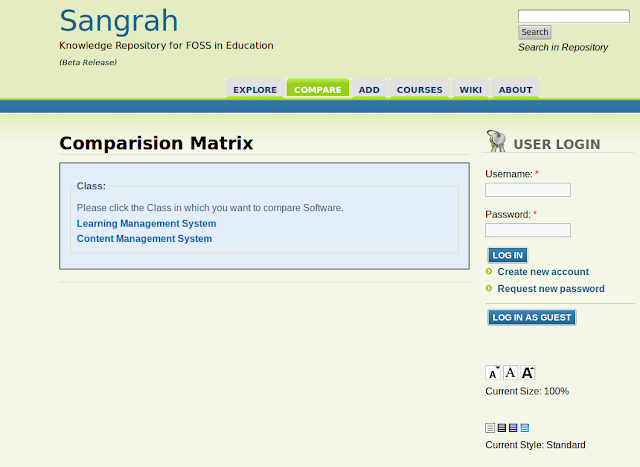
The portal is maintained with least manual intervention as most of the tasks including, resource collection, categorization, user experience identification, comparative analysis, etc are largely automated.
The portal is intended for academic institutions, entrepreneurs, among others to help them to adopt Free and Open Source Softwares (FOSS). The portal is still evolving, so kindly provide your feedback, improvement suggestions through the feedback section on portal.
Kindly visit and register on the portal at - http://nrcfoss.cdacmumbai.
Regards
sangram Team.

The portal is maintained with least manual intervention as most of the tasks including, resource collection, categorization, user experience identification, comparative analysis, etc are largely automated.
The portal is intended for academic institutions, entrepreneurs, among others to help them to adopt Free and Open Source Softwares (FOSS). The portal is still evolving, so kindly provide your feedback, improvement suggestions through the feedback section on portal.
Kindly visit and register on the portal at - http://nrcfoss.cdacmumbai.
Regards
sangram Team.
Monday, June 17, 2013
PGDST Course Details of CDAC Kharghar
Hello,
C-DAC Mumbai is offering 1-year full-time Post Graduate Diploma in Software Technology (PG-DST) for the past several years with excellent placement records. The course provides a systematic blend of theory and hands-on, foundational and advanced concepts, and includes current trends and technologies.
Admission is now open for the next batch of PG-DST commencing on 27th August 2013, and its admission test (CST) will be held on 14th July 2013.
Course Synopsis
The 1-year full-time PG-DST course offers a carefully defined blend of theory and hands-on, foundational and advanced concepts, and includes current trends and technologies. The overall objective of the course is to build usable technical skills for practical application development over web and mobiles, using state-of-the-art technologies and frameworks. The course lays emphasis on the ability to move effectively from problem statements to working programs.
While learning programming languages, one often tends to focus on the intricacies of the language, rather than looking at it as a tool for problem solving. Keeping this in mind, the whole course is built around the notion of “from problems to programs”. All relevant software engineering practices are given emphasis from the beginning, including bug tracking, version control, project management, and so on. PG-DST has practical assignments or mini-projects in every module that provide exposure to a number of state-
of-the-art software tools and environments.
The course exposes the candidates to a variety of tools and frameworks, and expects proficiency in them. The list includes programming languages (C, C++ and Java), database systems (MySQL, Oracle, Hibernate, NoSQL), development frameworks (Spring, HTML-5, PHP, JavaScript), tools in software engineering (Redmine, Git), Operating systems (Gnu/Linux, Windows, Android), etc.
PG-DST Syllabus
PG-DST Centre: C-DAC Kharghar
Course Commencement: 27th August 2013
Fees: Rs 79,000/-
Eligibility Criteria: Graduate in any subject
Admission Test: Competence in Software Technology (CST) Exam
General Aptitude (1 hour)
Logical reasoning, Quantitative reasoning, Visual-spatial reasoning, High school mathematics, Vocabulary, English comprehension & Verbal ability
Computer Concepts (1 hour)
Computer basics, Data representation, Binary arithmetic, Foundations, Computer architecture, Computer languages, Operating System basics, Basic programming using C
CST Exam Date: 14 July 2013
CST Exam Venues: Bengaluru, Mumbai, Noida & Patna
Last Date of Submitting CST Application Form: 3 July 2013
CST Application Fee: Rs 500/- (to be paid as DD or cash at C-DAC Kharghar)
Announcement of CST Results: 24 July 2013
For more information: entrance-mumbai@cdac.in
With best regards,
PG-DST Coordinator
C-DAC, Near Kharghar Rly Stn, Navi Mumbai (Tel 022-27565303)
C-DAC, Gulmohar Crossroad No. 9, Juhu, Mumbai (Tel 022-26703251)
C-DAC Mumbai is offering 1-year full-time Post Graduate Diploma in Software Technology (PG-DST) for the past several years with excellent placement records. The course provides a systematic blend of theory and hands-on, foundational and advanced concepts, and includes current trends and technologies.
Admission is now open for the next batch of PG-DST commencing on 27th August 2013, and its admission test (CST) will be held on 14th July 2013.
Course Synopsis
The 1-year full-time PG-DST course offers a carefully defined blend of theory and hands-on, foundational and advanced concepts, and includes current trends and technologies. The overall objective of the course is to build usable technical skills for practical application development over web and mobiles, using state-of-the-art technologies and frameworks. The course lays emphasis on the ability to move effectively from problem statements to working programs.
While learning programming languages, one often tends to focus on the intricacies of the language, rather than looking at it as a tool for problem solving. Keeping this in mind, the whole course is built around the notion of “from problems to programs”. All relevant software engineering practices are given emphasis from the beginning, including bug tracking, version control, project management, and so on. PG-DST has practical assignments or mini-projects in every module that provide exposure to a number of state-
of-the-art software tools and environments.
The course exposes the candidates to a variety of tools and frameworks, and expects proficiency in them. The list includes programming languages (C, C++ and Java), database systems (MySQL, Oracle, Hibernate, NoSQL), development frameworks (Spring, HTML-5, PHP, JavaScript), tools in software engineering (Redmine, Git), Operating systems (Gnu/Linux, Windows, Android), etc.
PG-DST Syllabus
- Programming & Problem Solving - Procedural programming, Object oriented programming, Data structures, Algorithm design and analysis, File handling, Multi-threaded programming.
- Operating System Concepts & Networking - Resource & CPU scheduling, Concurrency control, Memory management, Networking protocols, OSI layers & functions, Network security.
- Database Technologies - SQL & query optimization, Database design, Relational databases, Object oriented databases, ORM technologies, Unstructured data.
- Web Application Development - Client-server/Multi-tier architecture, JavaScript, HTML5, GUI design, Server side programming with PHP, Web development framework, Web services and SOA.
- Software Engineering - Requirement gathering, Analysis & design, Software development life cycle including agile, Bug tracking, Version control, Software architecture including design patterns.
- Advanced Topics - Machine Learning, Data mining, Mobile computing, Cloud computing, etc.
- Soft Skills - Communication, Presentation, Time management, Team handling, etc.
- Live Project - Complete development project covering the entire SDLC.
- Excellent placement record.
- Over 30 years of history in training software professionals.
- Practical assignments or mini-projects in every module.
- Complete development project covering the entire SDLC as course project including use of version control and bug-tracking.
- Exposure to a number of state-of-the-art software tools and environments.
- Systematic blend of foundational concepts and practical skills.
- Use of technology enhanced education for improved learning and assessment.
- Some universities consider PG-DST as equivalent to the first year of their MSc programme.
- Hostel facility available on a first-come-first-served basis.
PG-DST Centre: C-DAC Kharghar
Course Commencement: 27th August 2013
Fees: Rs 79,000/-
Eligibility Criteria: Graduate in any subject
Admission Test: Competence in Software Technology (CST) Exam
General Aptitude (1 hour)
Logical reasoning, Quantitative reasoning, Visual-spatial reasoning, High school mathematics, Vocabulary, English comprehension & Verbal ability
Computer Concepts (1 hour)
Computer basics, Data representation, Binary arithmetic, Foundations, Computer architecture, Computer languages, Operating System basics, Basic programming using C
CST Exam Date: 14 July 2013
CST Exam Venues: Bengaluru, Mumbai, Noida & Patna
Last Date of Submitting CST Application Form: 3 July 2013
CST Application Fee: Rs 500/- (to be paid as DD or cash at C-DAC Kharghar)
Announcement of CST Results: 24 July 2013
For more information: entrance-mumbai@cdac.in
With best regards,
PG-DST Coordinator
C-DAC, Near Kharghar Rly Stn, Navi Mumbai (Tel 022-27565303)
C-DAC, Gulmohar Crossroad No. 9, Juhu, Mumbai (Tel 022-26703251)
Thursday, June 13, 2013
Changing Properties of Terminal / Console using termios
Linux Devices are designed for interactive use, that means devices used both for input and for output. All the devices have a similar interface derived from the serial TeleType paper-display terminals and thus dubbed the tty interface. tty(TeleType) is a interface which is used to access serial terminals, consoles, xterms, network logins and many more.
All tty manipulation can be done using termios structure and several functions which all are defined in
struct termios
{
tcflag_t c_iflag; /* input mode flags */
tcflag_t c_oflag; /* output mode flags */
tcflag_t c_cflag; /* control mode flags */
tcflag_t c_lflag; /* local mode flags */
cc_t c_line; /* line discipline */
cc_t c_cc[NCCS]; /* special characters */
}
c_iflag - determines how received characters are interpreted & processed
c_oflag - determines how your process writes to the tty are interpreted & processed
c_cflag - determines serial protocol characteristics of the devices
c_lflag - determines how characters are collected & processed before they are sent to output processing
The main two functions which are used to manipulate tty are
tcgetattr() - to get a device's current settings, modify those settings
tcsetattr() - to make the modify settings active
Now lets write a small program, where we can change the properties of our terminal / console pro-grammatically so that we can read a password without echoing it in console / terminal. To understand the code do not forget to read comments in the code.
// File Name: termios.c
#include <stdio.h>
#include <termios.h>
#include <unistd.h>
void main()
{
struct termios termios_temp, termios_orig;
char pwdbuffer[1024];
// getting and saving current termios settings
tcgetattr(STDIN_FILENO, &termios_temp);
termios_orig = termios_temp;
// changing current termios settings, so that entered password can't be echoed
termios_temp.c_lflag &= ~ECHO;
termios_temp.c_lflag |=ECHONL;
tcsetattr(STDIN_FILENO, TCSAFLUSH, &termios_temp);
printf("NOTE: termios settings changed, so entered pwd can't be echoed :-)\n");
// checking that the settings took effect or not
tcgetattr(STDIN_FILENO, &termios_temp);
if(termios_temp.c_lflag & ECHO)
{
fprintf(stderr, "failed to turn off echo");
// setting original termios settings
tcsetattr(STDIN_FILENO, TCSANOW, &termios_orig);
}
// getting pasword and printing the password
printf("Enter Password:");
fflush(stdout);
fgets(pwdbuffer, 1024, stdin);
printf("Your Entered Password is: %s", pwdbuffer);
// setting original termios settings
tcsetattr(STDIN_FILENO, TCSANOW, &termios_orig);
printf("NOTE: termios settings changed to original:-)\n");
}
To Run: gcc termios.c
./a.out
All tty manipulation can be done using termios structure and several functions which all are defined in
struct termios
{
tcflag_t c_iflag; /* input mode flags */
tcflag_t c_oflag; /* output mode flags */
tcflag_t c_cflag; /* control mode flags */
tcflag_t c_lflag; /* local mode flags */
cc_t c_line; /* line discipline */
cc_t c_cc[NCCS]; /* special characters */
}
c_iflag - determines how received characters are interpreted & processed
c_oflag - determines how your process writes to the tty are interpreted & processed
c_cflag - determines serial protocol characteristics of the devices
c_lflag - determines how characters are collected & processed before they are sent to output processing
The main two functions which are used to manipulate tty are
tcgetattr() - to get a device's current settings, modify those settings
tcsetattr() - to make the modify settings active
Now lets write a small program, where we can change the properties of our terminal / console pro-grammatically so that we can read a password without echoing it in console / terminal. To understand the code do not forget to read comments in the code.
// File Name: termios.c
#include <stdio.h>
#include <termios.h>
#include <unistd.h>
void main()
{
struct termios termios_temp, termios_orig;
char pwdbuffer[1024];
// getting and saving current termios settings
tcgetattr(STDIN_FILENO, &termios_temp);
termios_orig = termios_temp;
// changing current termios settings, so that entered password can't be echoed
termios_temp.c_lflag &= ~ECHO;
termios_temp.c_lflag |=ECHONL;
tcsetattr(STDIN_FILENO, TCSAFLUSH, &termios_temp);
printf("NOTE: termios settings changed, so entered pwd can't be echoed :-)\n");
// checking that the settings took effect or not
tcgetattr(STDIN_FILENO, &termios_temp);
if(termios_temp.c_lflag & ECHO)
{
fprintf(stderr, "failed to turn off echo");
// setting original termios settings
tcsetattr(STDIN_FILENO, TCSANOW, &termios_orig);
}
// getting pasword and printing the password
printf("Enter Password:");
fflush(stdout);
fgets(pwdbuffer, 1024, stdin);
printf("Your Entered Password is: %s", pwdbuffer);
// setting original termios settings
tcsetattr(STDIN_FILENO, TCSANOW, &termios_orig);
printf("NOTE: termios settings changed to original:-)\n");
}
To Run: gcc termios.c
./a.out
Sunday, June 2, 2013
Adding / Injecting Audio Track to Video Without Audio
Suppose you have a video file and that video has no sound. You have a separate audio Mp3 file which is of same length (same play time) as video file and you want to inject / add that audio file to video file. How it can be done?
It can be done by using mencoder, is a encoder for popular MPlayer.
To Add / inject audio file into video file, please following the following instructions.
Step-1: Install mencoder using following command
$sudo apt-get install mencoder.
Step-2: Move audio file and video without audio file into same folder
$mv myAudio.mp3 /home/myhome/InjectAudo/
$mv myVideo.avi /home/myhome/InjectAudo/
Step-3: Run following commands to add/ inject audio into video
$cd /home/myhome/InjectAudo/
$mencoder -ovc copy -audiofile myAudio.mp3 -oac copy myVideo.avi -o OutPutAVFile.avi
Step-4: Play OutPutAVFile.avi file.
It can be done by using mencoder, is a encoder for popular MPlayer.
To Add / inject audio file into video file, please following the following instructions.
Step-1: Install mencoder using following command
$sudo apt-get install mencoder.
Step-2: Move audio file and video without audio file into same folder
$mv myAudio.mp3 /home/myhome/InjectAudo/
$mv myVideo.avi /home/myhome/InjectAudo/
Step-3: Run following commands to add/ inject audio into video
$cd /home/myhome/InjectAudo/
$mencoder -ovc copy -audiofile myAudio.mp3 -oac copy myVideo.avi -o OutPutAVFile.avi
Step-4: Play OutPutAVFile.avi file.
Subscribe to:
Posts (Atom)